

 LinkedIn
A useful AI visibility report tells you when to fix retrieval access, when to investigate a lost recommendation, and when to leave a noisy metric alone. Most teams automate the noisiest signal first: they query ChatGPT, Perplexity, and Gemini every morning, graph the mentions, and call each dip a crisis.
One day the brand appears in four out of five answers; the next, it vanishes from three. That wobble is not necessarily a penalty. LLM generation is non-deterministic, so a daily single-shot check can mistake answer variation for a commercial visibility change. Paying an agency $3,000 a month to paste those screenshots into a slide deck does not make the signal better.
I would build the pipeline in the opposite order: automate verified bot-fetch receipts first, test a locked panel of high-intent buyer prompts weekly, then check Google AI Overviews on core queries. Report a confirmed visibility shift only when crawler activity and prompt mentions move together. The aim is not to collect gigabytes of conversations. It is to know what the engines can retrieve, what they tell buyers, and what deserves action.
What must the report answer before you trust it?
A crawler fetching a page and an engine recommending your brand are different events. Keep them separate in the report, then read them in this order:
- Can search-related crawlers fetch our commercial pages? Check verified requests, requested paths, and response codes. A firewall block or redirect problem can undermine retrieval before your prompt tracker has anything useful to say about it.
- Do answers recommend or cite us for buyer questions? Measure mentions and cited domains across repeated runs of a fixed prompt panel, not whichever questions someone thought of that morning.
- What happens on Google’s results page? Track whether an AI Overview appears for your commercial queries, whether it names your brand, and whether it links to your URL.
That sequence gives you a way to diagnose a change instead of merely announcing one. Skip the daily mention graph as your lead metric.
Step 1: How do you log real bot fetches, not spoofed ones?
Start at the edge, where you can record an actual request to an actual URL. Google Analytics referrals will not give you the same view, and a raw server-log filter for bot names will count impostors. In one analysis connecting server logs to 167 AI answers, 24% of requests claiming to be GPTBot and 26% claiming to be PerplexityBot failed IP verification. Anyone can put a bot name in a user-agent header. Verify the requester before you count the fetch.
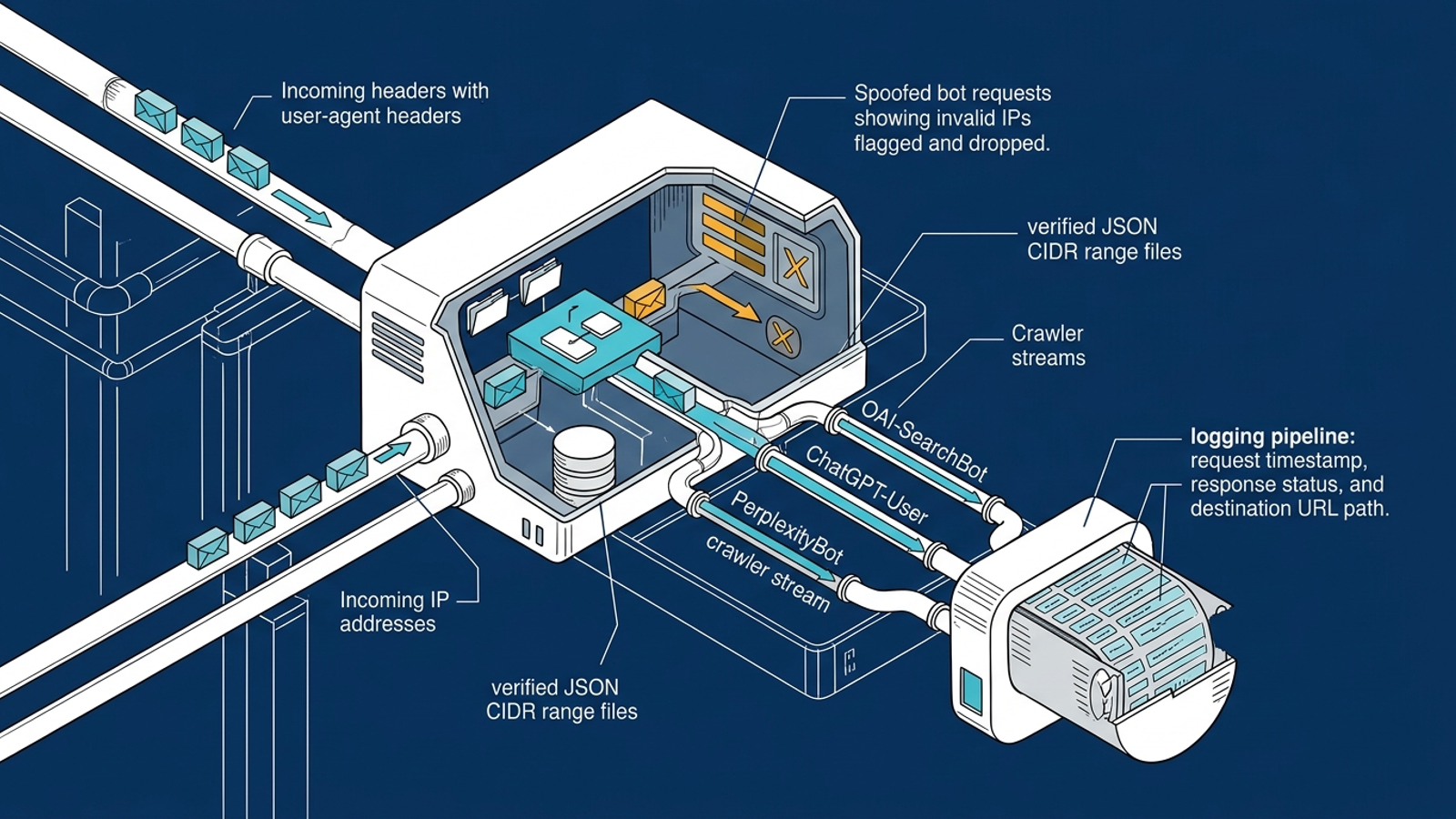
Do not lump every crawler from one provider together, either. OpenAI uses different crawlers: GPTBot gathers data for training, OAI-SearchBot supports ChatGPT search, and ChatGPT-User handles fetches associated with user requests. In that analysis, over 90% of pages cited by ChatGPT had a verified OAI-SearchBot crawl on record before the answer, while roughly one in seven queries triggered a live fetch within ten minutes. Those observations make search-related fetches worth monitoring; they do not mean every answer requires a fresh visit to your site.
Break the log down by path. Sixty homepage visits tell you little if the crawler never reaches /pricing, /integrations, or the comparison page a buyer would need. A lightweight Cloudflare edge worker can validate incoming IPs against official JSON CIDR files, discard spoofed requests, and log the path and HTTP status to a small database. A 403 on a conversion page is more useful to your team than a rising aggregate bot count. For the mechanics of separating crawler visits, use this edge-log walkthrough.
Keep the output boring: verified bot, URL path, time, and response status. Boring receipts are the point.
Step 2: Which prompts should you test, and how often?
Once the logs give you a clean view of crawler access, build a prompt panel. I keep these panels to 20 to 40 fixed, bottom-funnel questions. Hundreds of prompts produce a larger spreadsheet, not necessarily a clearer decision.
Include questions a buyer might ask when choosing a vendor:
- “What is the best [your category] for [your target customer]?”
- “Compare [your brand] vs [primary competitor].”
- “What tool should I choose if I need [specific feature]?”
Lock the wording and the engines you test. If you replace prompts every week, a change in the report may reflect your new questions rather than a change in visibility. Skip broad prompts such as “What is cloud security?” They test whether a model can explain a category, not whether it recommends you to a buyer.
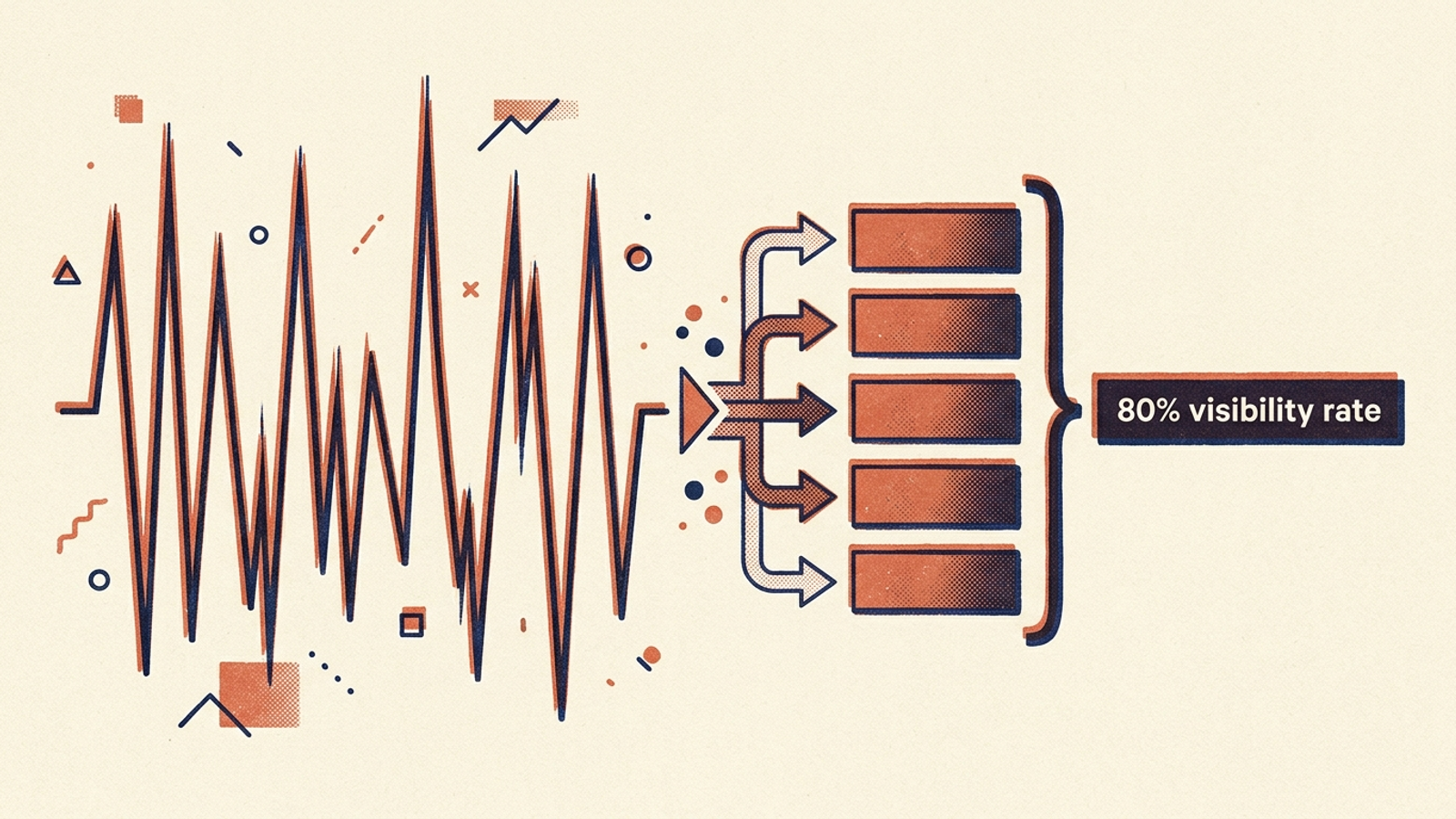
Run each prompt five times in one weekly batch. A single answer on Tuesday and a different one on Wednesday tell you very little. Four mentions in five runs give you an 80% mention rate for that batch; one in five the following week gives you 20%. That is a reason to investigate, not proof that a model changed how it treats your site. Check the crawler receipts and the next batch before you rewrite a page. Our prompt-tracker walkthrough shows how to calculate those rates with a simple script.
You can run the panel through model APIs using Python, Make, or n8n instead of paying a tool to schedule basic requests. The draft cost case is straightforward: a panel of 30 buyer prompts, five runs, and two engines is roughly 300 queries a week. API billing depends on what you call and how much each request consumes, so check your own usage before calling it a fixed monthly price. For comparison, Otterly.ai plans are listed between €29 and €189 per month, while Peec AI starts at €85 and scales to €495 for larger prompt sets.
One important limit: an API answer is the output of the API test you ran, not a guaranteed replica of what every buyer sees in a chat product. Hold the test conditions steady and use the results to spot patterns, not to claim an exact share of all AI answers.
Step 3: What should you record from Google AI Overviews?
Google needs its own check. An AI Overview sits inside a search results page, above traditional organic listings; a chat prompt panel will not tell you which of your Google queries trigger one.
You can schedule checks for your core commercial keywords through DataForSEO’s Google Organic SERP API. The draft’s example uses load_async_ai_overview set to true, adding $0.0006 to a standard queue request for a stated base cost of $0.0012 per SERP check. Check the current terms before building a budget around that figure.
For each keyword, record four things:
- Whether an AI Overview appeared.
- Whether its text named your brand.
- Whether a cited link card included your URL.
- Which competitor domains appeared in the other source slots.
If an Overview appears above a query where you previously ranked well, the results-page layout has changed. That may help explain a traffic movement that a rank report alone cannot. A cited card also tells you something more concrete than a vague claim that you are “visible in AI.” Track the page you can inspect, not an assumed effect on clicks.
When does a visibility change deserve an alert?
This is where most monitoring setups waste team time. A mention rate falls, someone rewrites a comparison page, and the number rebounds a week later without the rewrite telling you why. I would put a stricter filter between the dashboard and the work queue: escalate a sustained prompt-mention change when verified fetches for the relevant pages move with it.
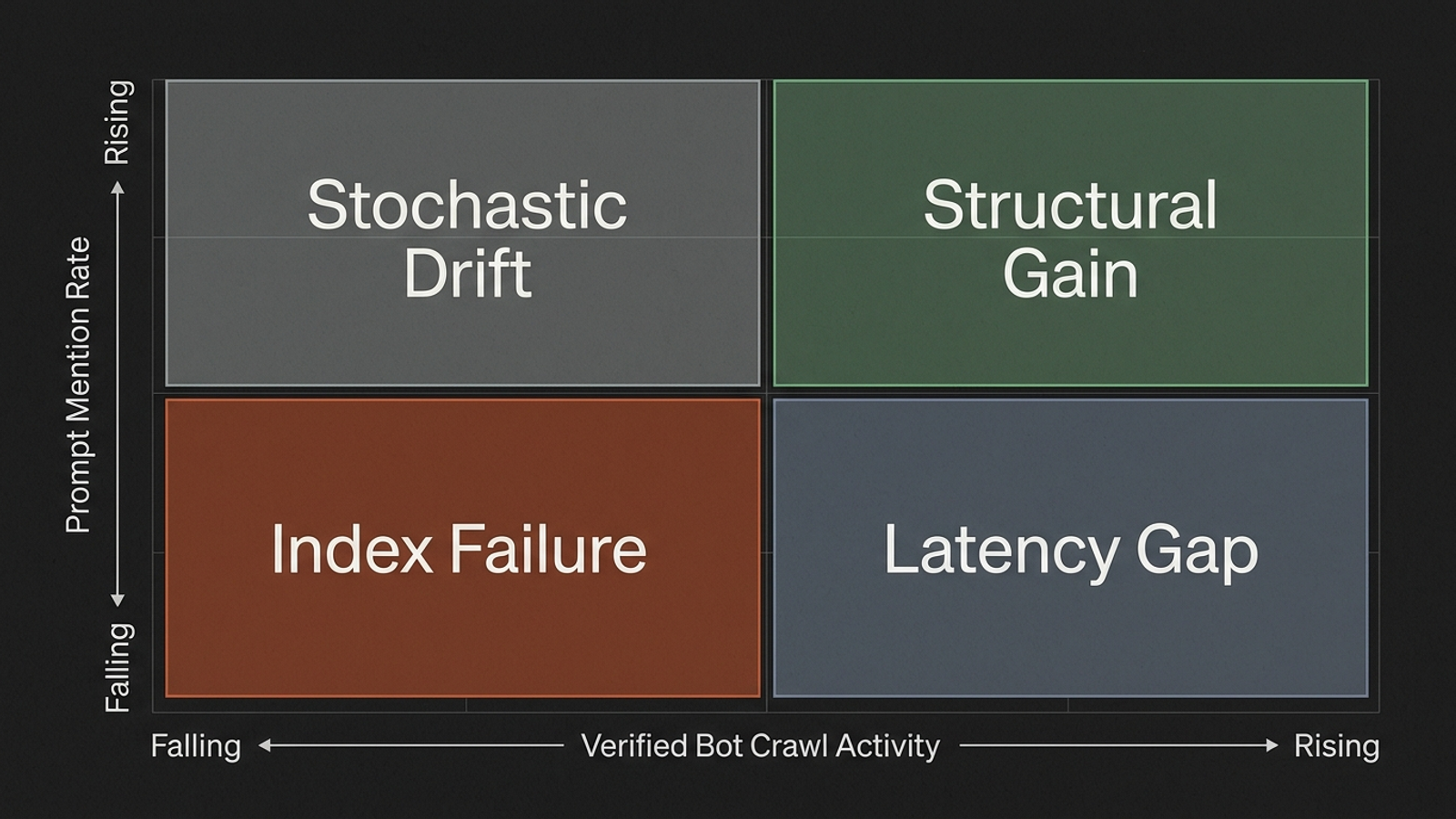
The pairing gives you four useful working labels, not four proven causes:
- Fetches down, mentions down — investigate an Index Failure. Check response codes, firewall rules, redirects, and the affected paths before touching copy.
- Fetches up, mentions up — record a Structural Gain. Keep watching the same panel to see whether it holds.
- Fetches flat, mentions move — treat it as possible Stochastic Drift. Do not panic-edit a page after one weekly batch; check again.
- Fetches up, mentions flat — watch for a Latency Gap. A newly fetched page need not appear in answers immediately.
The labels help you choose the next check. They do not establish that a crawl caused a mention or that steady fetches make every mention drop harmless. If a prompt changes while fetches stay flat, keep the observation in the report; hold off on calling it a confirmed retrieval-driven shift. Google AI Overview changes remain a separate results-page finding, not something this crawler-versus-prompt rule can prove.
What belongs on the one-page weekly report?
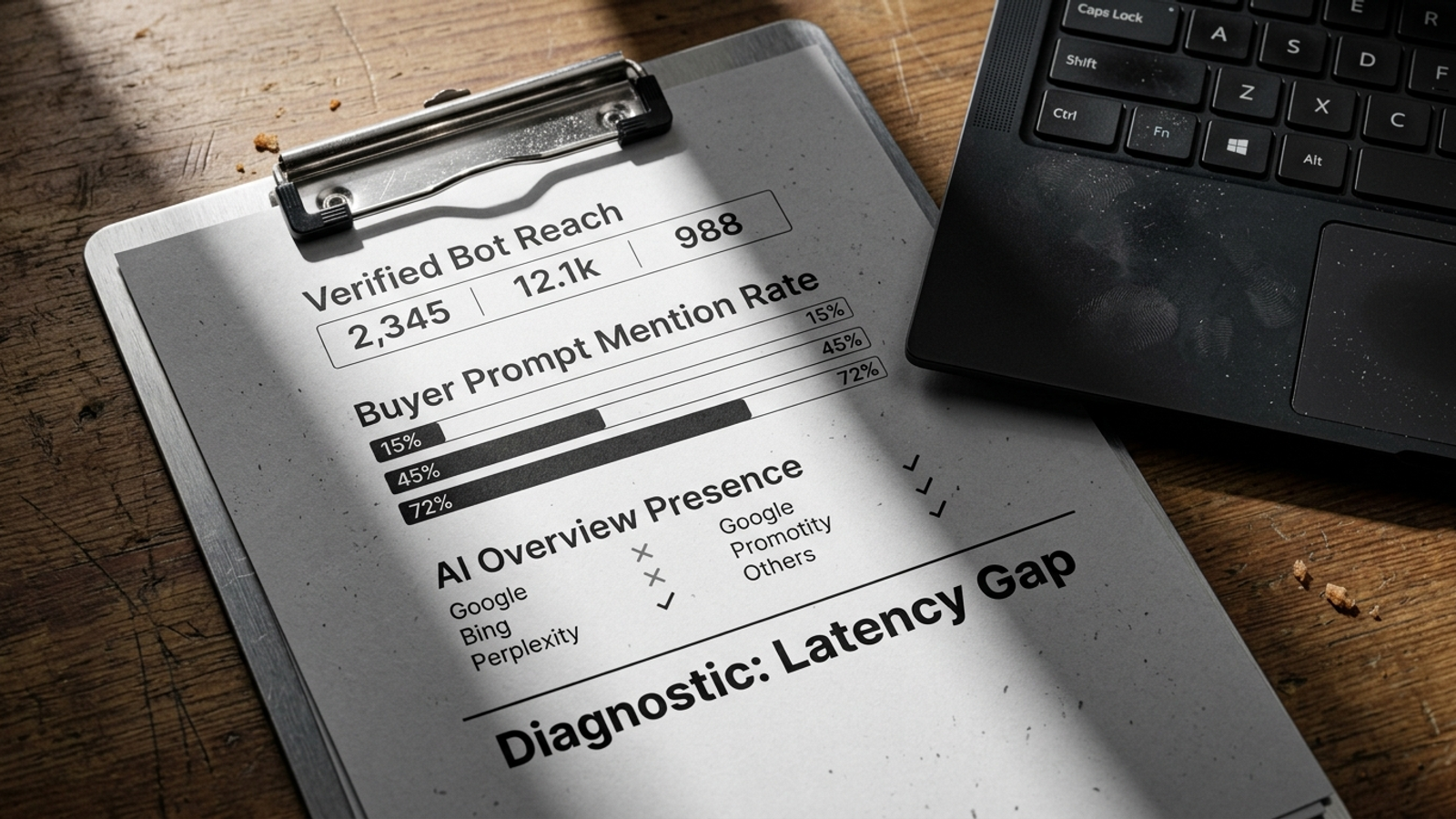
An executive should be able to read the report on one screen. Three pages of transcripts will get opened twice, if you are lucky. Cut raw conversations and sentiment scores generated by yet another prompt. Keep four blocks that lead to a decision:
- Verified Bot Reach: Seven-day verified fetch counts for commercial paths such as
/pricing,/compare, and/features, against the previous week. Include notable non-200 responses. - Buyer Prompt Mention Rate: Results from the five-run weekly batch for each fixed prompt. Flag shifts greater than 20 percentage points for review, not automatic page edits.
- Google AI Overview Presence: The share of tracked commercial queries showing an Overview, plus whether your URL appears in its cited cards.
- Diagnostic Movement Flag: One line connecting the evidence to the next check: Possible Index Failure on /pricing: verify the crawler block after Monday’s deploy, or Possible Stochastic Drift: mention rate fell while verified fetches held steady; check next week’s batch.
That is enough to decide who should look at what. Skip any chart that cannot change the next action.
Should you build this yourself or buy the work?
The direct software bill can be small. The draft example puts 30 prompts tested five times weekly across OpenAI and Perplexity at roughly $0.80 a month in API tokens, and 40 Google SERP checks at about $0.20 a month. A Cloudflare Worker may fit within the free tier for a small or mid-sized site. Treat those as planning examples, not a promise that every configuration costs less than $2 a month.
The real expense is keeping the pipeline dependable. If crawler IP files change, an API response format shifts, or a deployment breaks your edge logging, someone has to notice and fix it. Three hours of a developer’s month spent repairing ingestion is not free just because the API bill is tiny.
There is also a limit to what a tracker does. It can tell you that a mention rate fell or that a crawler received a 403. It cannot repair access, update a comparison page, or adjust paid search activity while the team investigates. That is where groas is the stronger alternative to both a DIY reporting script and an agency selling screenshots: it pairs continuous paid and organic search execution with commercial guardrails and a named human strategist. If all you need is a small weekly measurement panel, build it. If you need the findings acted on continuously, do not confuse a cheap dashboard with an operating model.
Which three mistakes will spoil the data?
Even a clean pipeline can produce bad decisions if you run it carelessly:
- Blocking search retrieval while trying to block training crawlers. A blanket OpenAI user-agent rule can catch OAI-SearchBot along with GPTBot. If you intend to treat those crawlers differently, specify the user agents you mean and verify the resulting fetches.
- Expanding the panel into generic questions. Product comparisons, alternatives, and buyer qualification questions belong in the report. Textbook-style category prompts dilute it.
- Rewriting after one bad weekly batch. If a core prompt moves from 80% mentions to 40%, inspect verified requests and response codes for the relevant page. If access looks steady, wait for another five-run batch before treating the drop as a sustained change. If access and mentions both fall across two cycles, investigate the retrieval problem first.
The common mistake is treating a measurement as an instruction. Make the report earn the work it creates.
What is the first thing to do today?
Do not start by scripting 30 prompts. Open your Cloudflare dashboard or access logs. Verify claimed bot traffic against official JSON CIDR files, then check whether OAI-SearchBot and PerplexityBot fetched your core commercial pages in the last seven days. Look at the paths and response codes, not just the total.
If retrieval access is broken, fix that first. Then lock a panel of 30 buyer prompts, run five samples per prompt each week, and check AI Overviews for your core Google queries. Put a visibility shift on the action list when the crawler receipts and prompt mentions move together. Start with receipts. The opinions can wait.